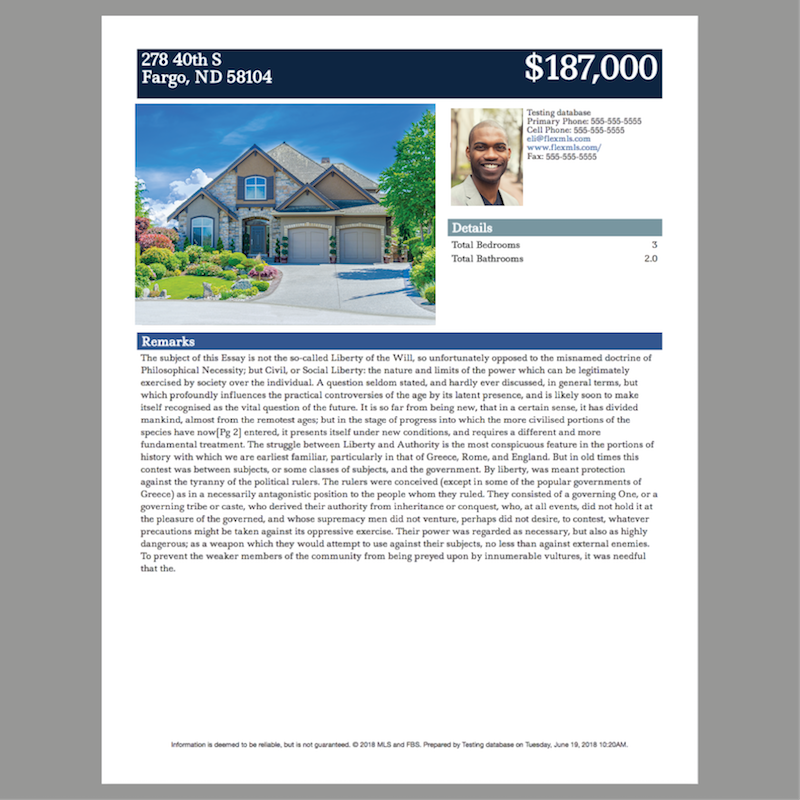
Tessera Reports are quick, one-page listing reports that are easy to create and edit. As part of our continuing efforts to improve them, starting on July 5th we are releasing two updates on Flexmls Web: you will now be able to use either your profile photo or logo in branding container; and there is a new report template, Flyer with Long Remarks, that can display up to 2000 characters.
When will it change?
These updates will be available on July 5, 2018.
Who will be affected?
All users with the ability to create and edit Tessera reports will have access to these new features.
What will change?
To create a new Tessera Report, or to edit an existing report, use the Menu to find and select My Reports. Click on an existing Tessera Report and select Edit to edit an existing report, or select New and choose the Tessera Report option. Then click on a Tessera Report template to create a new report.
How can I use my logo on reports?
If the report template has a branding container, click on it to edit the container.
Select Logo for the Image option, and click Update to apply the change to the report. Now, whenever you use the report, your logo will display by default in the branding container.
What is the flyer with long remarks template?
From the My Reports page, select New and choose Tessera Report. Then select the Flyer with Long Remarks option.
The template includes a larger container that can display up to 2000 characters. This is especially useful if your MLS allows over 1000 characters for the Public Remarks field.
Why are we making these changes?
These changes are part of an ongoing effort to improve Tessera Reports and ensure that they meet the needs of agents and brokers. Providing more options while keeping the report writer easy to use ensures that anyone can use it to create simple, attractive flyers.

